
RPSync Job Center
RPSync Job Center
Section titled “RPSync Job Center”Professional and modern job selection system designed for ESX Legacy servers.
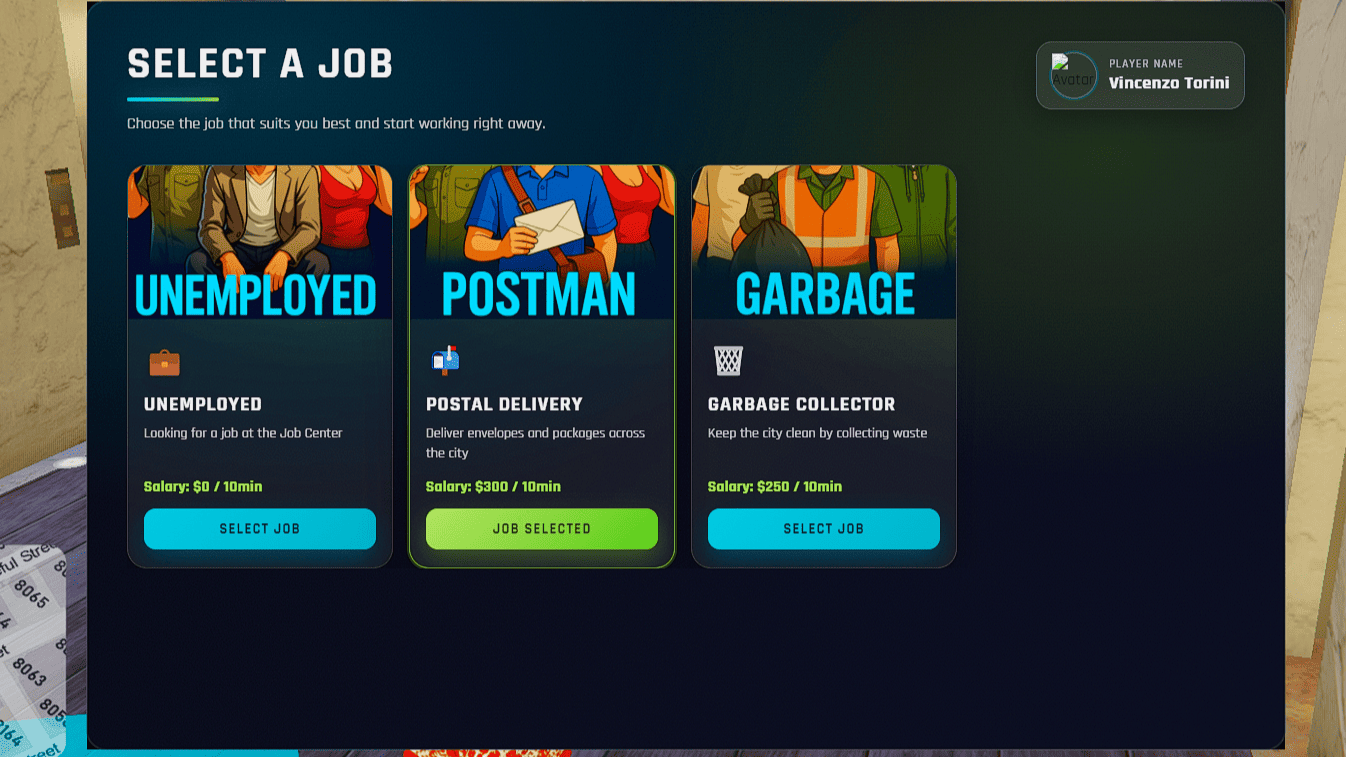
RPSync Job Center provides a clean gaming-style interface, optimized performance, secure server-side validation and easy configuration — all in a lightweight package.
✨ Features
Section titled “✨ Features”Core Features
Section titled “Core Features”- Modern gaming-style UI
- Multilingual support (EN / FR ready)
- Optional level system
- Map blip and marker
- Job images support
- Salary display
- Easy configuration
- Escrow protection
UI Features
Section titled “UI Features”- Cyan themed modern interface
- Smooth animations
- Player avatar display
- Job selection feedback
- Locked jobs display
- Responsive layout
⚡ Performance
Section titled “⚡ Performance”The script is optimized for performance.
| State | Performance |
|---|---|
| Idle | 0.00 ms |
| Near marker | 0.01 ms |
Optimizations include:
- smart distance checks
- async operations
- optimized loops
🔒 Security
Section titled “🔒 Security”Security is handled server-side.
- Server-side job validation
- Anti-spam protection
- Cannot bypass job selection via client
- Escrow protection for UI files
📋 Requirements
Section titled “📋 Requirements”Before installing make sure your server has:
- FiveM server running
- ESX Legacy framework
- oxmysql installed
- Basic server knowledge
📦 Installation
Section titled “📦 Installation”Installation takes less than 5 minutes. :contentReference[oaicite:3]{index="3"}
Step 1 — Download
Section titled “Step 1 — Download”Download the script from your Tebex purchase.
Extract the archive to:
resources/rpsync_jobcenter
Step 2 — Add to server.cfg
Section titled “Step 2 — Add to server.cfg”Add the resource:
ensure rpsync_jobcenterRecommended order:
- ensure es_extended
- ensure rpsync_jobcenter
Step 3 — Restart server
Section titled “Step 3 — Restart server”Restart the resource:
restart rpsync_jobcenter
or restart the entire server.
Step 4 — Test the script
Section titled “Step 4 — Test the script”Go to the Job Center location:
-265.99, -961.24, 31.22
Press E to open the Job Center.
⚙️ Configuration
Section titled “⚙️ Configuration”All configuration is located in:
config.lua
Language
Config.Locale = 'en'Available languages: (more soon)
en, frJob Center Location
Section titled “Job Center Location”Config.JobCenter = { Blip = { Coords = vector3(-265.99, -961.24, 31.22), Sprite = 407, Colour = 3, Name = "Job Center" }, Marker = { Coords = vector3(-265.99, -961.24, 31.22), Color = {r = 0, g = 188, b = 212} }}Adding Jobs
Section titled “Adding Jobs”Example job configuration:
{ name = 'mechanic', label = 'Mechanic', description = 'Fix vehicles', icon = '🔧', salary = 350, image = 'mechanic.png', requiredLevel = 0, canSelect = true}Disable a Job
Section titled “Disable a Job”canSelect = false🖼 Job Images
Section titled “🖼 Job Images”Recommended size: 300x160px Place images in: html/images/ Example structure:
html/images/police.pngambulance.pngmechanic.pngtaxi.png🗃 Database Setup
Section titled “🗃 Database Setup”Verify jobs exist in database.
SELECT * FROM jobs;Add a job if missing:
INSERT INTO jobs (name, label) VALUES ('mechanic', 'Mechanic');Add grades:
INSERT INTO job_grades (job_name, grade, name, label, salary) VALUES('mechanic', 0, 'trainee', 'Trainee', 300),('mechanic', 1, 'mechanic', 'Mechanic', 400);🎨 Customization
Section titled “🎨 Customization”Change UI Color
Section titled “Change UI Color”Default color : #00bcd4
Edit : html/style.css
Replace with your own color.
Change Marker Color
Marker = {Color = {r = 255, g = 0, b = 255}}🧑💻 Player Usage
Section titled “🧑💻 Player Usage”Players must:
- Go to the Job Center
- Press E
- Select a job
- Confirm selection
The current job will appear highlighted.
🐛 Troubleshooting
Section titled “🐛 Troubleshooting”Menu does not open
Section titled “Menu does not open”Check:
- Resource started
- ESX loaded
- Player near marker
- No F8 errors
Jobs not showing
Section titled “Jobs not showing”Check:
- canSelect = true
- job exists in database
- config.lua correctly configured
Images not displaying
Section titled “Images not displaying”Check:
- image name matches config
- file exists in html/images
- file format is PNG or JPG
📊 Changelog
Section titled “📊 Changelog”2.0.5
- Improved security
- Anti-spam protection
- Performance optimization
- Documentation improvements
2.0.0
- Modern UI redesign
- Multilingual system
- Job images support
- Performance improvements
📞 Support
Section titled “📞 Support”Before requesting support:
- Check documentation
- Check F8 console
- Restart resource
Support channels:
📜 License
Section titled “📜 License”RPSync License
Allowed:
- Use on your server
- Modify configuration
- Modify translations
Not allowed:
- Resell
- Redistribute
- Remove escrow protection